
[mk_page_section bg_image=”https://syncsite.net/wp-content/uploads/2014/09/bg-overlay.png” attachment=”fixed” bg_position=”center center” section_id=”page-header” sidebar=”sidebar-1″ first_page=”false” last_page=”false”][vc_column][mk_page_title_box page_title=”Infor CRM Support Help Topics” section_height=”100″ font_color=”#ffffff” font_weight=”bold” underline=”false” padding=”0″][/vc_column][/mk_page_section][vc_row][vc_column][mk_padding_divider size=”20″][vc_column_text css=”.vc_custom_1548788428773{margin-bottom: 0px !important;}”]Syncsite provides online, email and telephone support to meet all issues. Below you find help topics related to known issues to further enhance our support capabilities.[/vc_column_text][mk_fancy_title color=”#1b75bc” size=”30″ font_weight=”bold” margin_bottom=”18″ font_family=”none”]How to Install Outlook Integration and Xbar[/mk_fancy_title][vc_column_text css=”.vc_custom_1552918642663{margin-bottom: 0px !important;}”]Outlook Integration Steps
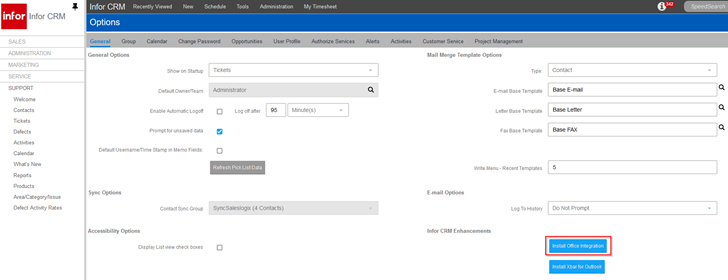
- Sign into the web client and go to – Tools > Options
- Click “Install office integration”
Xbar Installation Steps
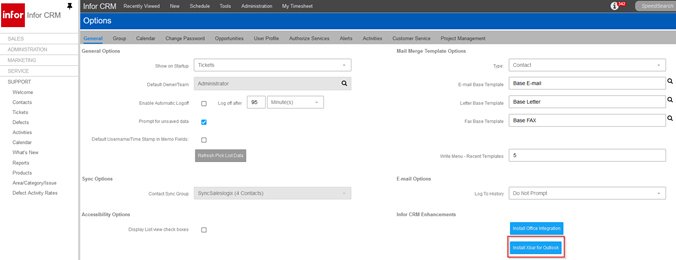
- Sign into the web client and go to – Tools > Options
- Click “Install Xbar for Outlook”
 [/vc_column_text][mk_padding_divider][/vc_column][/vc_row][vc_row][vc_column][mk_padding_divider][/vc_column][/vc_row]